Win10怎么把所有哈希值校验算法添加到文件右键层叠菜单中?

Win10怎么把所有哈希值校验算法添加到文件右键层叠菜单中?此前小编给大家介绍了《Win10如何在文件右键菜单中添加哈希值校验选项?》,然而很多用户反馈能否将所有哈希值校验算法添加到文件右键菜单中,最好是层叠菜单。办法当然是有啦,同样需要制作一个注册表文件添加到注册表中,下面我们来看看具体的操作方法。

Win10怎么把所有哈希值校验算法添加到文件右键层叠菜单中?
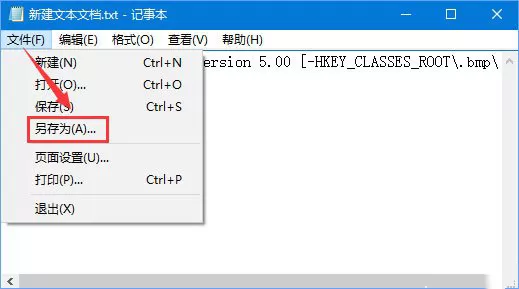
1、把下面的内容复制到记事本中:
01Windows Registry Editor Version 5.00
02[HKEY_CLASSES_ROOT\*\shell\文件哈希校验]
03"SubCommands"="MACTripleDES;MD5;RIPEMD160;SHA1;SHA256;SHA384;SHA512"
04"MUIVerb"="文件哈希校验"
05[HKEY_LOCAL_MACHINE\SOFTWARE\Microsoft\Windows\CurrentVersion\Explorer\CommandStore\shell\MACTripleDES]
06@="MACTripleDES"
07[HKEY_LOCAL_MACHINE\SOFTWARE\Microsoft\Windows\CurrentVersion\Explorer\CommandStore\shell\MACTripleDES\command]
08@="PowerShell Get-FileHash -Algorithm MACTripleDES \\\"%1\\\" | format-list;“按任意键退出...”;[Console]::Readkey() | Out-Null;exit"
09[HKEY_LOCAL_MACHINE\SOFTWARE\Microsoft\Windows\CurrentVersion\Explorer\CommandStore\shell\MD5]
10@="MD5"
11[HKEY_LOCAL_MACHINE\SOFTWARE\Microsoft\Windows\CurrentVersion\Explorer\CommandStore\shell\MD5\command]
12@="PowerShell Get-FileHash -Algorithm MD5 \\\"%1\\\" | format-list;“按任意键退出...”;[Console]::Readkey() | Out-Null;exit"
13[HKEY_LOCAL_MACHINE\SOFTWARE\Microsoft\Windows\CurrentVersion\Explorer\CommandStore\shell\RIPEMD160]
14@="RIPEMD160"
15[HKEY_LOCAL_MACHINE\SOFTWARE\Microsoft\Windows\CurrentVersion\Explorer\CommandStore\shell\RIPEMD160\command]
16@="PowerShell Get-FileHash -Algorithm RIPEMD160 \\\"%1\\\" | format-list;“按任意键退出...”;[Console]::Readkey() | Out-Null;exit"
17[HKEY_LOCAL_MACHINE\SOFTWARE\Microsoft\Windows\CurrentVersion\Explorer\CommandStore\shell\SHA1]
18@="SHA1"
19[HKEY_LOCAL_MACHINE\SOFTWARE\Microsoft\Windows\CurrentVersion\Explorer\CommandStore\shell\SHA1\command]
20@="PowerShell Get-FileHash -Algorithm SHA1 \\\"%1\\\" | format-list;“按任意键退出...”;[Console]::Readkey() | Out-Null;exit"
21[HKEY_LOCAL_MACHINE\SOFTWARE\Microsoft\Windows\CurrentVersion\Explorer\CommandStore\shell\SHA256]
22@="SHA256"
23[HKEY_LOCAL_MACHINE\SOFTWARE\Microsoft\Windows\CurrentVersion\Explorer\CommandStore\shell\SHA256\command]
24@="PowerShell Get-FileHash -Algorithm SHA256 \\\"%1\\\" | format-list;“按任意键退出...”;[Console]::Readkey() | Out-Null;exit"
25[HKEY_LOCAL_MACHINE\SOFTWARE\Microsoft\Windows\CurrentVersion\Explorer\CommandStore\shell\SHA384]
26@="SHA384"
27[HKEY_LOCAL_MACHINE\SOFTWARE\Microsoft\Windows\CurrentVersion\Explorer\CommandStore\shell\SHA384\command]
28@="PowerShell Get-FileHash -Algorithm SHA384 \\\"%1\\\" | format-list;“按任意键退出...”;[Console]::Readkey() | Out-Null;exit"
29[HKEY_LOCAL_MACHINE\SOFTWARE\Microsoft\Windows\CurrentVersion\Explorer\CommandStore\shell\SHA512]
30@="SHA512"
31[HKEY_LOCAL_MACHINE\SOFTWARE\Microsoft\Windows\CurrentVersion\Explorer\CommandStore\shell\SHA512\command]
32@="PowerShell Get-FileHash -Algorithm SHA512 \\\"%1\\\" | format-list;“按任意键退出...”;[Console]::Readkey() | Out-Null;exit"
复制代码Windows Registry Editor Version 5.00[HKEY_CLASSES_ROOT\*\shell\文件哈希校验]"SubCommands"="MACTripleDES;MD5;RIPEMD160;SHA1;SHA256;SHA384;SHA512""MUIVerb"="文件哈希校验"[HKEY_LOCAL_MACHINE\SOFTWARE\Microsoft\Windows\CurrentVersion\Explorer\CommandStore\shell\MACTripleDES]@="MACTripleDES"[HKEY_LOCAL_MACHINE\SOFTWARE\Microsoft\Windows\CurrentVersion\Explorer\CommandStore\shell\MACTripleDES\command]@="PowerShell Get-FileHash -Algorithm MACTripleDES \\\"%1\\\" | format-list;“按任意键退出...”;[Console]::Readkey() | Out-Null;exit"[HKEY_LOCAL_MACHINE\SOFTWARE\Microsoft\Windows\CurrentVersion\Explorer\CommandStore\shell\MD5]@="MD5"[HKEY_LOCAL_MACHINE\SOFTWARE\Microsoft\Windows\CurrentVersion\Explorer\CommandStore\shell\MD5\command]@="PowerShell Get-FileHash -Algorithm MD5 \\\"%1\\\" | format-list;“按任意键退出...”;[Console]::Readkey() | Out-Null;exit"[HKEY_LOCAL_MACHINE\SOFTWARE\Microsoft\Windows\CurrentVersion\Explorer\CommandStore\shell\RIPEMD160]@="RIPEMD160"[HKEY_LOCAL_MACHINE\SOFTWARE\Microsoft\Windows\CurrentVersion\Explorer\CommandStore\shell\RIPEMD160\command]@="PowerShell Get-FileHash -Algorithm RIPEMD160 \\\"%1\\\" | format-list;“按任意键退出...”;[Console]::Readkey() | Out-Null;exit"[HKEY_LOCAL_MACHINE\SOFTWARE\Microsoft\Windows\CurrentVersion\Explorer\CommandStore\shell\SHA1]@="SHA1"[HKEY_LOCAL_MACHINE\SOFTWARE\Microsoft\Windows\CurrentVersion\Explorer\CommandStore\shell\SHA1\command]@="PowerShell Get-FileHash -Algorithm SHA1 \\\"%1\\\" | format-list;“按任意键退出...”;[Console]::Readkey() | Out-Null;exit"[HKEY_LOCAL_MACHINE\SOFTWARE\Microsoft\Windows\CurrentVersion\Explorer\CommandStore\shell\SHA256]@="SHA256"[HKEY_LOCAL_MACHINE\SOFTWARE\Microsoft\Windows\CurrentVersion\Explorer\CommandStore\shell\SHA256\command]@="PowerShell Get-FileHash -Algorithm SHA256 \\\"%1\\\" | format-list;“按任意键退出...”;[Console]::Readkey() | Out-Null;exit"[HKEY_LOCAL_MACHINE\SOFTWARE\Microsoft\Windows\CurrentVersion\Explorer\CommandStore\shell\SHA384]@="SHA384"[HKEY_LOCAL_MACHINE\SOFTWARE\Microsoft\Windows\CurrentVersion\Explorer\CommandStore\shell\SHA384\command]@="PowerShell Get-FileHash -Algorithm SHA384 \\\"%1\\\" | format-list;“按任意键退出...”;[Console]::Readkey() | Out-Null;exit"[HKEY_LOCAL_MACHINE\SOFTWARE\Microsoft\Windows\CurrentVersion\Explorer\CommandStore\shell\SHA512]@="SHA512"[HKEY_LOCAL_MACHINE\SOFTWARE\Microsoft\Windows\CurrentVersion\Explorer\CommandStore\shell\SHA512\command]@="PowerShell Get-FileHash -Algorithm SHA512 \\\"%1\\\" | format-list;“按任意键退出...”;[Console]::Readkey() | Out-Null;exit"